

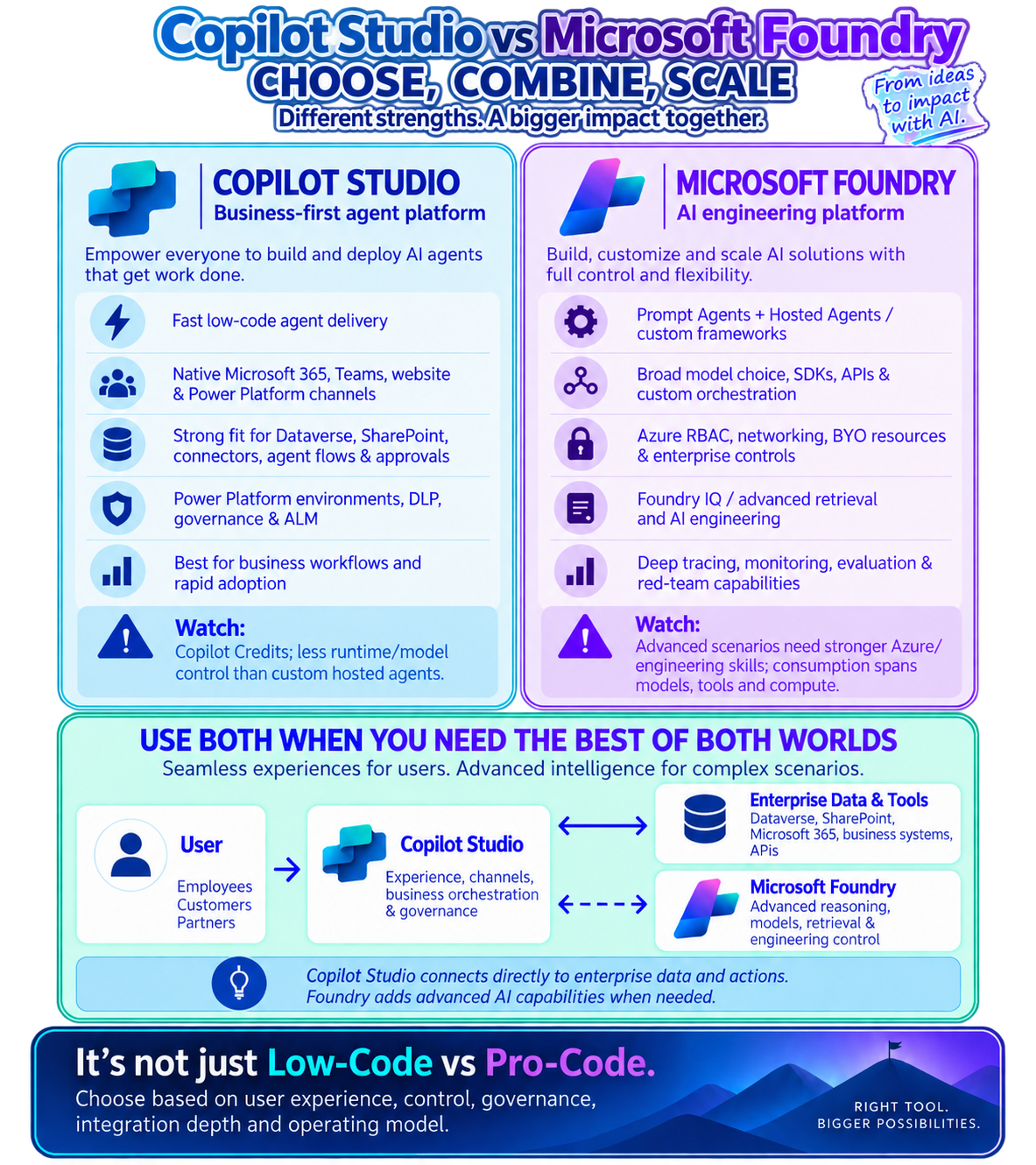
Copilot Studio vs Microsoft Foundry is becoming an important architecture decision as organizations build enterprise AI agents. While the platforms overlap in some areas, each has distinct strengths and in many scenarios, the best architecture combines both.
A practical enterprise architecture guide to choosing between Copilot Studio and Microsoft Foundry, understanding their strengths, and combining them for scalable AI agent solutions.
1. Introduction – Why This Comparison Matters
Copilot Studio or Microsoft Foundry? It’s Not an Either/Or Decision
As organizations accelerate their adoption of AI agents, one question comes up frequently:
Should we build the solution using Microsoft Copilot Studio or Microsoft Foundry?
The discussion is often simplified into:
Copilot Studio = low-code for business users
Microsoft Foundry = pro-code for developers
While there is some truth to that distinction, it doesn’t fully capture how these platforms should be used in enterprise architecture.
The better way to think about them is through separation of concerns.
Copilot Studio excels at delivering AI-powered business experiences, workflows, channels, and enterprise actions.
Microsoft Foundry provides deeper AI engineering capabilities when solutions require specialized models, advanced retrieval, custom orchestration, evaluation, networking, or greater runtime control.
And importantly:
You do not always have to choose one.
For many enterprise scenarios, they can complement each other.
2. Start With the Simplest Mental Model
A simple way to explain the difference is:
Copilot Studio = Business Experience + Orchestration
Microsoft Foundry = AI Engineering + Specialized Intelligence
This does not mean Copilot Studio cannot perform reasoning or Foundry cannot build complete agents.
Instead, it describes where each platform provides the most value in a typical enterprise architecture.
Think of it this way:
Copilot Studio asks:
How will users interact with this agent, and how will it participate in business processes?
Microsoft Foundry asks:
How should the AI reason, retrieve information, use models, and execute sophisticated AI workloads?
3. What Is Microsoft Copilot Studio?
Copilot Studio: Business-First Agent Platform
Microsoft Copilot Studio is designed to help organizations rapidly build and deploy agents that interact with users and business systems.
It is particularly well suited when the agent needs to work closely with the Microsoft business application ecosystem.
Key strengths
Copilot Studio is especially strong in:
- Microsoft Teams
- Microsoft 365 experiences
- Websites and conversational channels
- Dataverse
- SharePoint
- Power Platform connectors
- Power Automate and agent flows
- Business approvals
- Enterprise actions
- Power Platform environments
- DLP policies
- Solution-based ALM
- Business-user-oriented agent development
For organizations already using Power Platform, Dynamics 365, Dataverse, SharePoint, and Microsoft 365, this can significantly reduce the amount of custom plumbing required.
4. When Should You Use Copilot Studio?
Use Copilot Studio primarily when your requirement looks like this:
“I need an AI agent that helps users perform business processes.”
For example:
Scenario 1 – Employee HR Agent
An employee asks:
“How many vacation days do I have?”
The agent might:
- Identify the employee.
- Retrieve information from an HR system.
- Display the balance.
- Ask whether the employee wants to request leave.
- Start an approval workflow.
- Notify the manager.
Most of the complexity here is business process orchestration, not AI research.
Copilot Studio is a natural fit.
Scenario 2 – Customer Service Agent
A customer asks:
“What is the status of my service request?”
The agent could:
- Identify the customer.
- Retrieve a case from Dynamics 365.
- Explain its status.
- Update information.
- Create a follow-up task.
- Escalate to a human agent.
Again, this is largely about:
Conversation + Dataverse + business process + workflow.
Copilot Studio is well suited for this architecture.
5. What Is Microsoft Foundry?
Microsoft Foundry: AI Engineering Platform
Microsoft Foundry is designed for teams that need deeper control over how AI solutions are engineered.
It is also important to note that Microsoft Foundry is not synonymous with pro-code. Foundry supports declarative Prompt Agents for scenarios where instructions, models, and tools are sufficient, as well as Hosted Agents for solutions that require custom code, frameworks, dependencies, and deeper runtime control.
This becomes important when AI itself not simply the surrounding workflow—is the difficult part of the solution.
Typical requirements might include:
- Multiple models
- Specialized models
- Custom prompts
- Custom agent frameworks
- Advanced retrieval
- Foundry IQ
- Custom orchestration
- Complex multi-agent patterns
- SDK-based development
- APIs
- Evaluation frameworks
- Tracing
- Monitoring
- Red-team testing
- Private networking
- Azure RBAC
- Bring-your-own Azure resources
This gives AI engineers much greater flexibility over the underlying AI architecture.
6. When Should You Use Microsoft Foundry?
Use Microsoft Foundry primarily when the requirement looks more like:
“I need to engineer sophisticated AI behavior.”
Consider these examples.
Scenario 1 – Complex Document Intelligence Agent
Imagine an agent reviewing:
- Contracts
- Legal policies
- Financial documents
- Previous cases
- Industry regulations
The agent may need to:
- Retrieve information from multiple repositories.
- Rank and rerank results.
- Compare conflicting documents.
- Use different models for different tasks.
- Synthesize evidence across multiple sources and return structured outputs.
- Evaluate response quality.
- Track model performance.
The challenging part of this solution is the AI engineering layer.
Foundry becomes a stronger fit.
Scenario 2 – Specialized AI Model
Suppose an organization has a model specifically trained for:
- Manufacturing defects
- Medical terminology
- Financial risk
- Scientific research
- Insurance underwriting
The organization may need more control over:
Model selection → prompts → retrieval → evaluation → security → runtime behavior.
That is where Foundry becomes particularly valuable.
7. The Most Important Point: Copilot Studio Can Directly Access Enterprise Systems
This is an important architectural distinction.
Do not assume the architecture must be:
User → Copilot Studio → Foundry → Enterprise System
Copilot Studio can directly integrate with business applications and enterprise data.
For example:
- Copilot Studio → Dataverse
- Copilot Studio → SharePoint
- Copilot Studio → Power Platform Connector
- Copilot Studio → API
- Copilot Studio → Power Automate
Foundry does not have to sit between Copilot Studio and every enterprise system.
This keeps the architecture simpler when advanced AI capabilities are unnecessary.
8. When Should You Use Both?
This is where enterprise architecture gets more interesting.
Consider an agent where users interact through Teams.
The agent must:
- Authenticate the user
- Retrieve Dataverse data
- Execute business workflows
- Start approvals
- Update Dynamics 365
But one specific request requires sophisticated AI analysis across thousands of documents.
Rather than forcing one platform to handle everything, divide the responsibilities.
Copilot Studio handles:
User Experience –> Conversation –> Business Process –> Enterprise Actions
While Microsoft Foundry handles:
Advanced Reasoning –> Specialized Models –> Advanced Retrieval –> AI Engineering
Copilot Studio can invoke the specialized Foundry capability only when it is required.
Production consideration: Feature availability continues to evolve. Copilot Studio can connect to Foundry IQ, while direct connection to a Microsoft Foundry agent is currently documented as preview. Some Foundry IQ agentic retrieval capabilities also remain in preview. Validate the current Microsoft documentation and regional availability before finalizing a production architecture
9. A Practical Hybrid Architecture
Conceptual Architecture
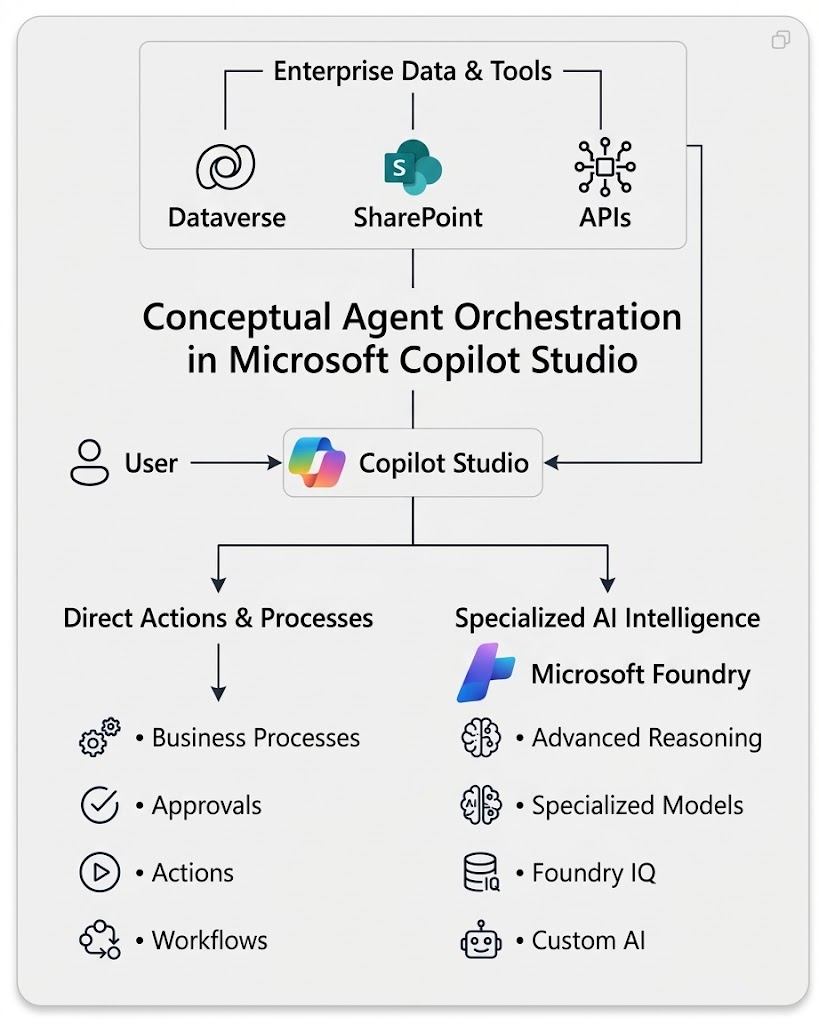
The critical point is that there are two paths.
Copilot Studio can communicate directly with enterprise systems.
It can also use Microsoft Foundry where deeper AI capabilities are required.
10. Separation of Concerns
This is the architectural principle behind the design.
Instead of asking:
Which product should own the entire agent?
Ask:
Which platform should own each responsibility?
11. Three Architecture Patterns
Pattern 1 – Copilot Studio Only
User –> Copilot Studio –> Dataverse / SharePoint / APIs / Power Automate
The primary requirement is business process automation, enterprise actions, and conversational interaction.
Example:
Employee self-service agent.
Pattern 2 – Microsoft Foundry Only
Application –> Foundry Agent –> Models + Retrieval + APIs + Enterprise Data
The solution primarily requires sophisticated AI engineering and does not need Copilot Studio’s business-facing orchestration layer.
Example:
A custom AI research application embedded inside a proprietary product.
Pattern 3 – Copilot Studio + Microsoft Foundry
User –> Copilot Studio –>
- Enterprise Business Systems
- Microsoft Foundry –> Specialized AI
You need both:
Enterprise business orchestration and Advanced AI engineering.
For many sophisticated enterprise agents, this becomes a powerful architecture.
12. A Simple Decision Framework
When starting an AI agent project, ask these questions.
Question 1
Where will users interact with the agent?
If the answer is Teams, Microsoft 365, Power Platform, or a business application, Copilot Studio deserves strong consideration.
Question 2
Does the agent mainly execute business processes?
If yes, Copilot Studio may be sufficient.
Question 3
Do we need specialized models or sophisticated retrieval?
If yes, evaluate Microsoft Foundry.
Question 4
Do we need advanced model evaluation, tracing, red teaming, or engineering controls?
If yes, Foundry becomes increasingly relevant.
Question 5
Do we need both business orchestration and advanced AI?
Then consider a hybrid architecture.
13. Avoid the “Low-Code vs. Pro-Code” Trap
The decision should not simply be:
Business users → Copilot Studio
and
Developers → Microsoft Foundry
Enterprise systems are rarely that simple.
A developer may build sophisticated Copilot Studio solutions.
A business-oriented solution may still require Foundry.
And some Foundry scenarios may not need Copilot Studio at all.
The better decision criteria are:
User Experience
- Business Process
- Integration
- AI Complexity
- Security
- Governance
- Operational Control
14. Final Takeaway
Don’t Pick a Winner. Design the Right Architecture.
Copilot Studio and Microsoft Foundry solve overlapping but different architectural problems.
Think of:
Copilot Studio as particularly strong for:
Experience + Channels + Business Orchestration + Enterprise Actions
And:
Microsoft Foundry as particularly strong for:
Models + Advanced Retrieval + AI Reasoning + Engineering Control
Sometimes Copilot Studio is all you need.
Sometimes Foundry is the better choice.
And sometimes the strongest enterprise architecture is:
Copilot Studio for engagement and business orchestration, combined with Microsoft Foundry for specialized AI capabilities.
The objective should never be to force an entire AI solution into a single technology.
The objective is to put each responsibility in the platform best equipped to handle it.
How are you designing your enterprise AI agents today? Are you using Copilot Studio, Microsoft Foundry, or combining both based on workload responsibilities?